
Furniture & home decor · Available now

Settle “will it fit?” before the cart, not after delivery.
Mitasu for Home adds dimension sheets, a doorway-fit check, materials and finish, and assembly and delivery details to your Shopify product pages. No 3D models to build. No heavy AR to load.
Shoppers measure their doorway and type the number in. The answer is worked out in their own browser, and the number is sent nowhere.
- No 3D models, no AR
- Measurements never leave the shopper's browser
- Free plan, no card needed
The real storefront block
Go ahead and use it. This is what ships on the product page.
What follows isn't a mockup drawn for this page. It is the block your storefront renders, running on sample data for a corner sofa, with every tab a shopper would see. Put your front door's width and height in and it answers straight away. Try 28 in the width field and watch the verdict change.
Live demo — try it
It will be displayed on your storefront product page.
The width and height you type are used for the calculation and nothing else. Nothing reaches a server, and this demo stores nothing.
- Fabric
- Suits everyday living-room use
Dimensions read width × depth × height (W×D×H).
| Size | Width | Depth | Height | Seat height | Seat depth | Arm height |
|---|---|---|---|---|---|---|
| L 2.5P + chaise | 250 cm98.4 in | 170 cm66.9 in | 82 cm32.3 in | 41 cm16.1 in | 56 cm22 in | 58 cm22.8 in |
| L 3P + chaise | 280 cm110.2 in | 170 cm66.9 in | 82 cm32.3 in | 41 cm16.1 in | 56 cm22 in | 58 cm22.8 in |
Delivery boxes & getting it in
Where to measure: every width is the clear inside — the gap between the frames, not the outer trim. Door stops, skirting and handrails all take space away.
Front doorDoor height Floor to the inside top of the frame. If a door closer hangs down, measure to that.
Hallway cornerHallway width before the turn Hallway width before the turn, wall to wall.Hallway width after the turn Hallway width after the turn — often different, so measure both.
ElevatorElevator door width Width of the opening with the doors fully open.Elevator door height Height of that same opening.
ElevatorCar width Inside width of the car, wall to wall.Car depth Inside depth of the car, doors to back wall.Car height Inside ceiling height. Measure below lights or handrails if they hang down.
StairsStair width Clear stair width. If there is a handrail, measure to the inside of it.Headroom above the stairs Headroom at the tightest point, usually the turn.
Will it fit through your door?
Needs an opening of 72 cm28.3 in
The rest of the path — pick what you have
Measure the narrowest point on the delivery path — front door, hallway, corners, elevator — and enter the width.
This is a guide based on packaged sizes. Corners, ceilings and stairs can still limit access — please measure the actual path for large items.
| Size | Width | Depth | Height | Shipping weight |
|---|---|---|---|---|
| L 2.5P + chaise · Box 1 | 200 cm78.7 in | 95 cm37.4 in | 70 cm27.6 in | 45 kg99.2 lb |
| L 2.5P + chaise · Box 2 | 175 cm68.9 in | 95 cm37.4 in | 70 cm27.6 in | 38 kg83.8 lb |
| L 3P + chaise · Box 3 | 215 cm84.6 in | 95 cm37.4 in | 70 cm27.6 in | 50 kg110.2 lb |
| L 3P + chaise · Box 4 | 175 cm68.9 in | 95 cm37.4 in | 70 cm27.6 in | 38 kg83.8 lb |
On an L-shape the depth decides the fit, not the width: the chaise runs 170 cm, so you need 250 cm of clear wall on the short side to keep a walkway opposite. Suits living rooms from about 26 m² (280 sq ft).
Materials & finish
Upholstery
Polyester
Frame
Pine
Legs
SteelPowder-coated
Firmness
1 = soft · 5 = firm
Care
Washable cover
Rotate cushions
Avoid direct sunlight
No abrasives
CertificationsOEKO-TEX
Cleaning codeW · water-based cleaners
Abrasion45000 double rubsSuits everyday living-room use
Natural variationFabric colour can vary slightly between dye lots; order spare covers together where possible.
Color can look different on your screen and under your lighting than it does in person.
Assembly
Assembly requiredYes
Estimated timeabout 20 min
People needed2
ToolsHex key
Delivery
Delivery methodFreight carrier
Estimated lead timeabout 3–5 week(s)
On deliveryUnpacked and set up
Carry up stairsIncluded (no extra fee)
Our crew carries it to the room you choose, assembles it and takes every piece of packaging away.
Lead times are estimates shown by the store and may vary by region and season.
Room scenes
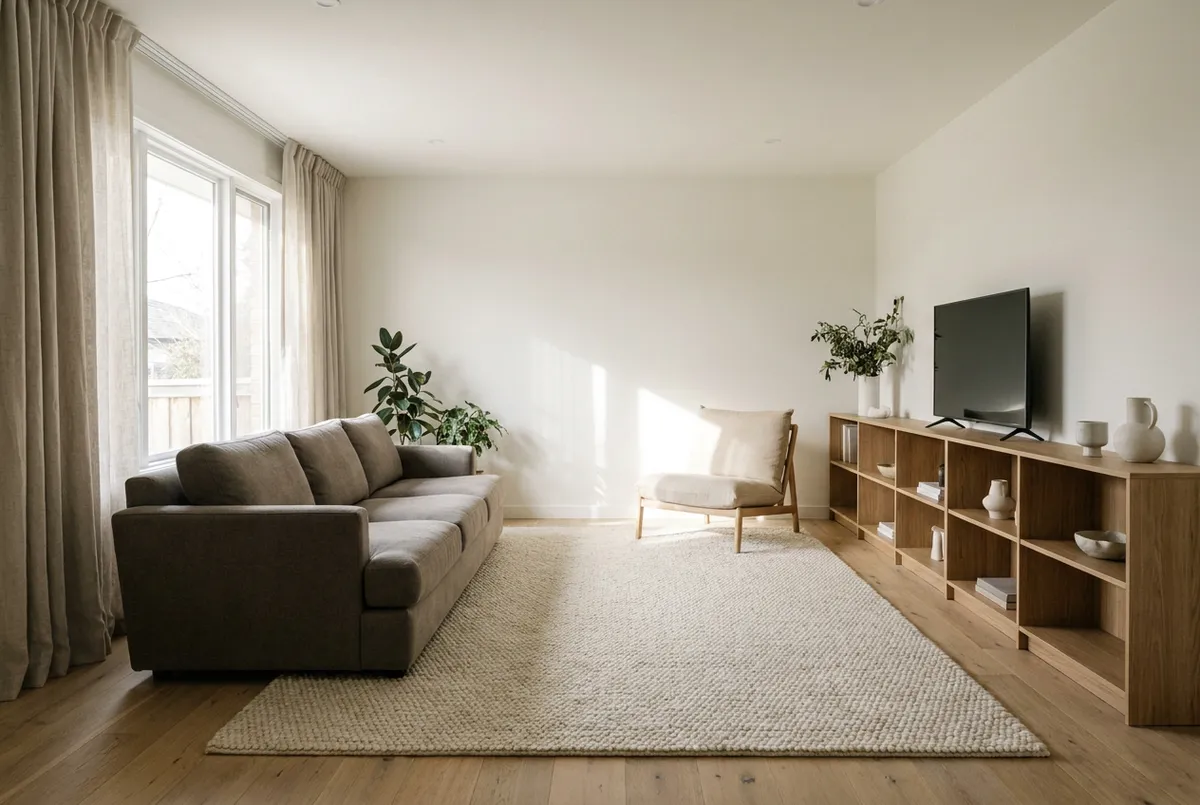 Family living roomliving · 28 m²
A full 3-seater plus a lounge chair; the 170x240 rug anchors the seating group.
Photographs are affected by the lighting and camera settings on the day, so colors may differ from the piece itself.
Complete the room
Deep seats and a dense wool pile stand up to daily family use; the low shelf doubles as a media bench.
Goes well with
 Halden 3-Seat Sofa
$1,690.00
Halden 3-Seat Sofa
$1,690.00
 Wool Loop Rug
$349.00
Wool Loop Rug
$349.00
 Nook Lounge Chair
$690.00
Nook Lounge Chair
$690.00
 Kit Low Bookshelf
$249.00
Kit Low Bookshelf
$249.00
Owner feedback
Own this piece? Share how it feels.
How firm is the seating?
How does the color compare with the photos?
How was the assembly?
Will it fit through my door? What should I measure?
Measure four spots: your front-door width, hallway width, any tight corners, and the elevator opening. Enter the narrowest width into the doorway-fit check on the product page and it compares against the packaged box sizes. The result is a guide - for large pieces we recommend measuring the delivery path.
Does it need assembly? Are tools included?
It varies by product. The Assembly & delivery section on each product page lists whether assembly is needed, the estimated time, how many people, and the tools. Most pieces assemble with the included hex key.
How long does delivery take?
The Assembly & delivery section lists the delivery method and the estimated lead time in weeks. Large pieces may ship via a white-glove service, which can take longer than parcel delivery.
What does white-glove delivery include?
The crew carries the piece to the room of your choice, unpacks it, completes any assembly, and takes all packaging away. It is offered on sofas, beds and large tables - you will see the option at checkout when it applies.
What happens if it does not fit through my door?
Tell the delivery crew on the spot, or contact us within 48 hours, and we arrange a return or an exchange for a smaller size. The doorway-fit check on the product page is the best way to avoid this - it flags a tight fit before you order.
How do I clean a spill on upholstery?
Check the cleaning code under Materials & finish first. W means water-based cleaners are safe, S means solvent cleaners only, WS means either, and X means vacuum only - blot immediately, never rub, and test any cleaner on a hidden spot.
Sample data: corner sectional, L 2.5P + chaise W250 × D170 × H82cm / two boxes, the largest W200 × D95 × H70cm, 45kg. Votes are counted on this page only.
Everything furniture needs, in one block
From dimensions to assembly, answered before anyone asks.
The questions that land before a furniture purchase are fairly predictable: measurements, access, materials and care, how long assembly takes. Build the template once, assign it to the products that share it, and only the parts you switched on appear on the page.
Dimension sheets
Templates per furniture type — sofa, table, bed — with a field for every part. Shoppers flip between cm and inches themselves, and the numbers sit as badges on the dimension figure.
Doorway-fit check
The packaged size is measured against the narrowest point the shopper reports, and comes back as Fits, Very tight or Please check. The math runs in the browser, with a note saying it is a guide, not a promise.
Materials, finish & care
Bouclé on the seat, oiled oak on the legs — you can say that part by part. Firmness on a five-point scale, weight capacity, whether a damp cloth is safe, and any certification badges all sit in the same place.
Assembly & delivery
Assembly time, how many people and which tools, the box count, delivery method and lead time. If support types the same reply every day, it probably belongs on the page instead.
Pro
Owner feedback & verdicts
Buyers vote with one tap on firmness, color accuracy and how assembly went. Once enough votes land, a verdict such as “as firm as described” appears on its own. It reads differently from a star rating.
Pro
Sets & room scenes
Photos of the piece in a real room with the floor area in m², plus the matching pieces from the same series. A shopper looking at one item gets to picture the whole room.
Materials & finish
“Wood and fabric” on one line will not bring returns down.
On plenty of furniture pages the material field is a single line: wood, fabric, done. What a shopper wants is one level below that — which part is made of what, how it is finished, whether a damp cloth will ruin it. Mitasu for Home gives you somewhere to write it, part by part. Save it as a template and the rest of the series is one assignment away.
-
Materials and finish, per part
Seat, legs and top are separate entries, and the finish goes in too: oiled, lacquered, veneered. It's the detail a photo can't carry.
-
Firmness on a 1–5 scale
One is soft, five is firm. A number leaves less room for disappointment than “medium firm” ever did.
-
Weight capacity
How many kilos it will take. For shelving and dining chairs this can be the last thing a shopper checks before buying.
-
Care and certifications
Damp cloth or not, direct sunlight, when to re-oil. If the piece is certified, the badges sit right there with the rest.
Materials & finish (example)
- Seat
- Fabric (bouclé)
- Legs
- Oak, oiled finish
- Firmness
- 3 of 5 (medium)
- Max load
- 120 kg
- Care
- Damp cloth · keep out of direct sun
An example of how it renders on the product page. Add as many parts and rows as the product needs.
Plans & pricing
Start free. Move to Pro when you actually need it.
Dimension sheets and the doorway-fit check are both in the free plan. Pro is for the point where you start merchandising: room scenes, sets, owner feedback, and the analytics that read them back to you.
30-day free trial
Every install opens with 30 days of full Pro. No card needed. When the 30 days are up it switches back to Free by itself, so nothing starts charging unless you choose it.
Free
Free
Free forever · no card needed
Dimension sheets and the doorway-fit check — answer “will it fit?” first.
Start free Popular
Pro
$12.99/mo
or $129.99/year (save ~2 months)
Everything in Free, plus room scenes, owner feedback, analytics and bulk assignment.
Try Pro free for 30 days| Feature | Free | Pro |
|---|---|---|
| Dimension sheets & doorway-fit check | Included | Included |
| Materials & finish (per-part materials, firmness, weight capacity, care) | Included | Included |
| Assembly & delivery, and Q&A | Included | Included |
| CSV export | Included | Included |
| Room scenes & sets | Not included | Included |
| Owner feedback & verdicts | Not included | Included |
| Bulk assignment & CSV import | Not included | Included |
| Analytics & return data | Not included | Included |
Founding stores
The first ten stores get six months of Pro free and priority support, in exchange for telling us what the app is missing.
See what's involvedFAQ
Mitasu for Home FAQ
Availability
Is Mitasu for Home available now?
Yes.
Mitasu for Home is on the Shopify App Store, and you can start on the free plan.
It is a lightweight app for furniture and home-decor stores, built on the same foundation as Mitasu for Apparel.
The live demo further up this page is the real storefront block, so you can try it before you install.
Setup
Is setup difficult?
No.
After install, a setup screen builds the app's data definitions with a progress bar — about ten seconds, once.
Then the dashboard walks you through three steps: choose the features you'll use, create a dimension sheet from a template, and assign it to products.
Placing the block on your product page is one click from Settings — no theme code, no developer.
Dimensions & doorway fit
How do I build dimension sheets? Which kinds of furniture are covered?
45 templates cover 13 categories — sofas, dining tables, desks, chairs, beds, mattresses, bedding, pillows, shelves, rugs, curtains, lighting and kitchen.
Pick one and the right columns appear automatically (seat height and seat depth for a sofa, floor clearance for a bed frame, knee clearance for a table), each with a labeled measurement figure.
Twelve of the categories ship with a drawing; kitchen items use the table alone.
How do templates work when I have hundreds of products?
You build a dimension sheet once and assign it to every product that shares those measurements — four bed frames can share one sheet.
Pro assigns to many products at once, and can match the sheet's size names to each product's own variant names, so one sheet still reads correctly on a product that calls its sizes something else.
The number of sheets you need is set by how many product groups share a measurement table, not by how many products you sell.
Can I change the information on one product without affecting the others?
Yes, and in two different ways.
If this product simply sells a subset of the sheet's sizes under its own names, you map the rows — the numbers keep coming from the sheet, so correcting the sheet still reaches every product.
If this product's numbers genuinely differ, you take a snapshot for it instead; that deliberately detaches it from the template, which is the honest cost of saying "my numbers are not the sheet's".
Do shoppers see centimetres or inches?
Both — whichever suits them.
The block opens in inches and pounds for shoppers in the US and Canada and in centimetres and kilograms everywhere else, and a toggle lets anyone switch.
You enter the numbers once, in whatever unit you work in; the app stores them in centimetres and converts on display.
Can I bring in dimensions I already have?
Yes.
Paste a block of rows straight from a spreadsheet into the sheet editor — the columns are matched by their headers, in Japanese or English.
For whole catalogues, Pro imports a CSV keyed by template name, and CSV export is free on every plan so nothing you enter is ever trapped in the app.
How does the doorway-fit check decide? Why doesn't it appear on some products?
It compares the packaged carton against the narrowest point the shopper enters.
The check only appears when a carton actually needs more than the doorway width you choose in Settings (70, 76, 80 or 90 cm — a Japanese interior door, a North American 30-inch door, a European door, or a wide entrance).
Below that the block shows a single line saying it fits a standard doorway, and a sheet with no packaged sizes shows nothing at all: the app will not claim something fits without evidence.
So if the check is missing, the usual cause is that the packaged dimensions haven't been entered.
Product information
What product information does it add?
On the free plan: dimension sheets (furniture-type templates with cm/inch toggle and labeled diagrams), a doorway-fit check, material & finish profiles with care icons and weight capacity, assembly & delivery details, and product Q&A.
Pro adds room-scene images, matching-set suggestions and comfort feedback.
All of it lives in one App Block — “Dimensions and product details” — with no theme edits.
Can I show materials, finish and care?
Yes, and per part rather than per product — the frame, the seat and the cover each carry their own material and finish, because that is how furniture is actually built.
Alongside them you can show seat firmness on a five-step scale, weight capacity, certifications such as FSC or GREENGUARD, a cleaning code, and care guidance drawn from 16 built-in icons (wipe with a damp cloth, oil regularly, keep out of direct sunlight…).
No images to prepare.
What are room scenes and sets?
Room scenes are photographs of the piece in a real room, each carrying the room type and its size in square metres — so a shopper can judge it against a space they know instead of guessing from a studio shot.
Sets propose the pieces that finish a room together.
Both are Pro; up to four of each can be assigned per product.
Owner feedback & returns
What is owner feedback? Does it collect personal data?
Buyers answer three one-tap questions on the product page: how firm it is, how the colour compares with the photos, and how the assembly went.
Once enough votes accumulate on an axis, a short verdict such as "sits as described" appears.
Votes are stored as anonymous counts only — no names, no order details, no tracking cookie.
One browser can vote once per axis per product.
Before any votes arrive you can set your own honest note, and real owner data takes over once there is enough of it.
How does returns data come in? Does it sync with my order system?
There is no automatic sync, by design — the app never touches your orders and requests no order or customer permissions.
You import a CSV of returns containing only the product handle and the reason.
The app classifies the reasons (won't fit / colour & texture / comfort / damage) and shows the return rate before and after you improved a product's information, so you can see whether the work paid off.
Pro feature.
Plans & data
What’s the difference between Free and Pro? Is there a trial?
Free covers dimension sheets, the doorway-fit check, materials & finish, assembly & delivery info, product Q&A and CSV export.
Pro adds room-scene images, matching sets, comfort feedback, insights, CSV import and bulk editing for a flat $12.99/month (or $129.99/year — about two months free).
Every install starts with all Pro features free for 30 days; after that it drops to Free automatically — no surprise charges, and your data stays.
Where is the data stored?
Inside your own Shopify store — like the rest of the Mitasu series.
We keep nothing in an external database we run, so uninstalling deletes nothing and you can export to CSV anytime.
No lock-in.
Display & support
Does it require AR or 3D models?
No.
It is a lightweight, structured information block — not a heavy AR or 3D viewer.
The doorway-fit check runs entirely in the shopper’s browser: packaged dimensions are compared against the doorway and hallway widths they enter, and nothing is sent to your store or to us.
Will it slow my store down or conflict with my theme?
It adds no global script.
The block's JavaScript is loaded from inside the block itself, so a browser only fetches it on pages where you placed the block, and it attaches nothing to the page's global scope.
There are no theme file edits, no app-embed block and no third-party requests — the tabs and the unit toggle are plain CSS.
Uninstalling leaves your theme exactly as it was.
Can it display in my shoppers' languages?
The block ships in English, German, French, Spanish, Italian and Japanese at no extra cost — no separate multilingual add-on.
The labels follow the shopper's language automatically.
The content you write (a delivery note, a room-scene caption) is translated through Shopify's own Translate & Adapt, so it lives with the rest of your store's translations.
Where do I get support?
Email support@mitasu.tech, or use the contact form on this site.
The app also carries a full user manual and an auto-generated handover guide — a printable summary of which screens your store uses and what routine each one belongs to — so a new staff member can pick it up without you.
START TODAY
Stop writing the same reply about dimensions.
Build the template once and the rest of the series is one assignment away. Dimension sheets and the doorway-fit check are in the free plan.
View on the App Store Read the FAQ